


.webp)
Opening now...

You’ll need to use a desktop browser to set up your Streak account. You can install Streak now and finish setup on desktop later.
To get started with Chrome, install Streak from the Chrome Web Store on your desktop. Share your email and we'll send you the install link directly.
To get started with Safari, install Streak from the Mac App store on your desktop. Share your email and we'll send you the install link directly.
To get started with Edge, install Streak from the Edge Add-ons store on your desktop. Share your email and we'll send you the install link directly.


If you’ve installed Streak and completed onboarding on desktop, you can install the Streak app to access your pipelines on mobile.


"AI CRM" now means very different things depending on the tool. Some only draft and summarize when you ask. Others act on pipeline events without prompting. A few run multi-step tasks on their own.
This guide compares the best AI CRMs in 2026: Streak AI, HubSpot Breeze, Zoho Zia, and Pipedrive — what each one actually does, where it fits, and what it costs — so you can match a tool to how your team works.
Most CRM marketing uses "AI" to describe three different capabilities. Separating them is the fastest way to judge whether a tool will reduce work or just sit there until someone remembers to use it.
All three tiers are useful, and the mix is still settling — AI is relatively new in every tool here, and each vendor ships new capabilities quarter to quarter. For most teams today, the copilot and workflow-automation tiers are where the day-to-day value shows up, while agentic AI is the newest tier and adopting fast. Gartner expects a hybrid model to become the industry standard by 2028: CRM AI handling the routine work, while people focus on the complex, high-stakes conversations that actually need them.
The point of the three tiers isn't to crown one as the "real" AI. It's to compare tools by what they change in your actual workflow — what the AI does, when it runs, and what it costs to turn on — rather than by which product page sounds most advanced. The sections below look at each tool through that lens.
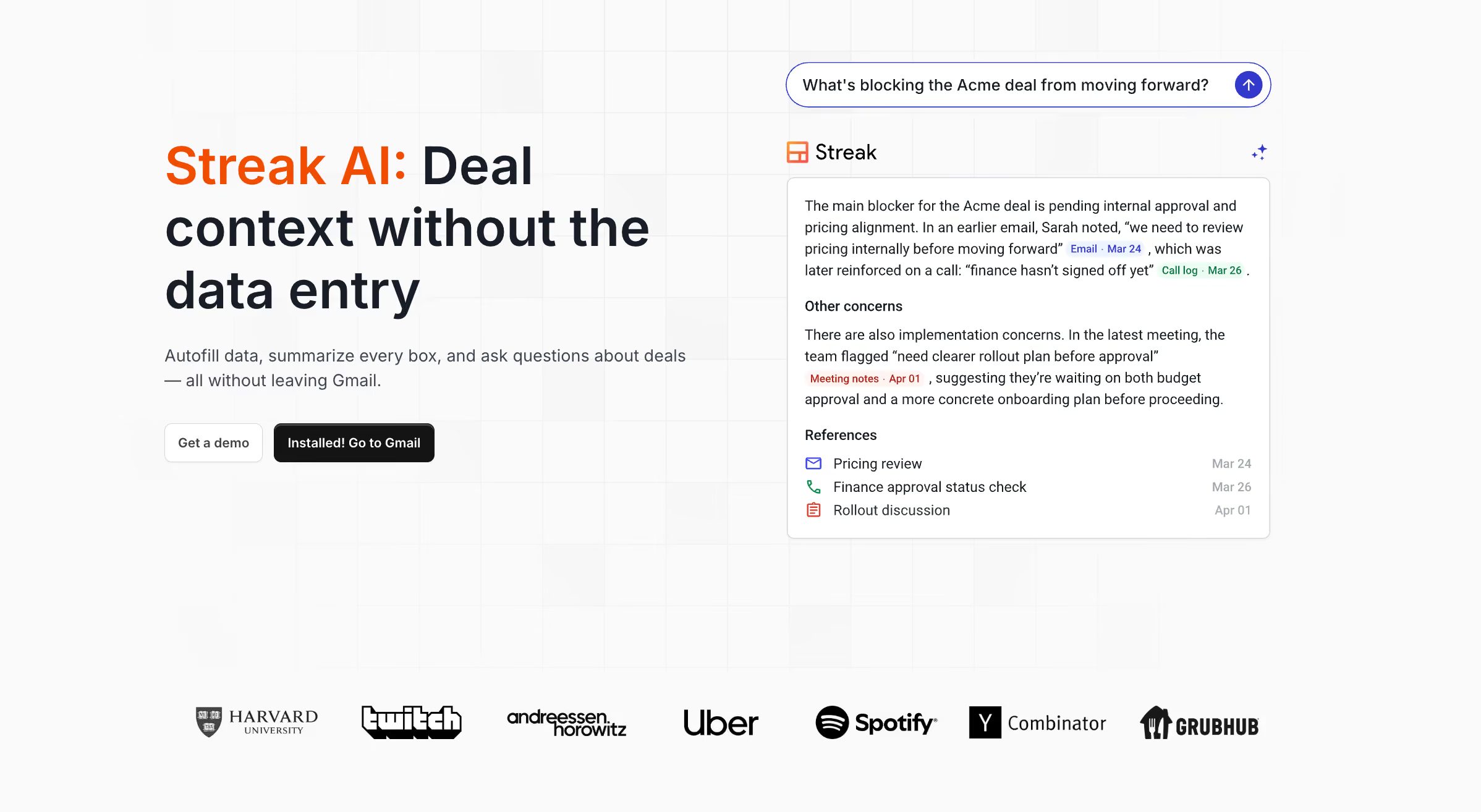
Measured against that framework, Streak is built around the two tiers that reduce work for most teams: a complete AI sales assistant and AI workflow automation that fires on its own. Both run inside Gmail, reading from a deal's full history — emails, notes, call logs, files — and the web. What makes Streak stand out is what the AI does and how easily a team can turn it on, not only where it lives.
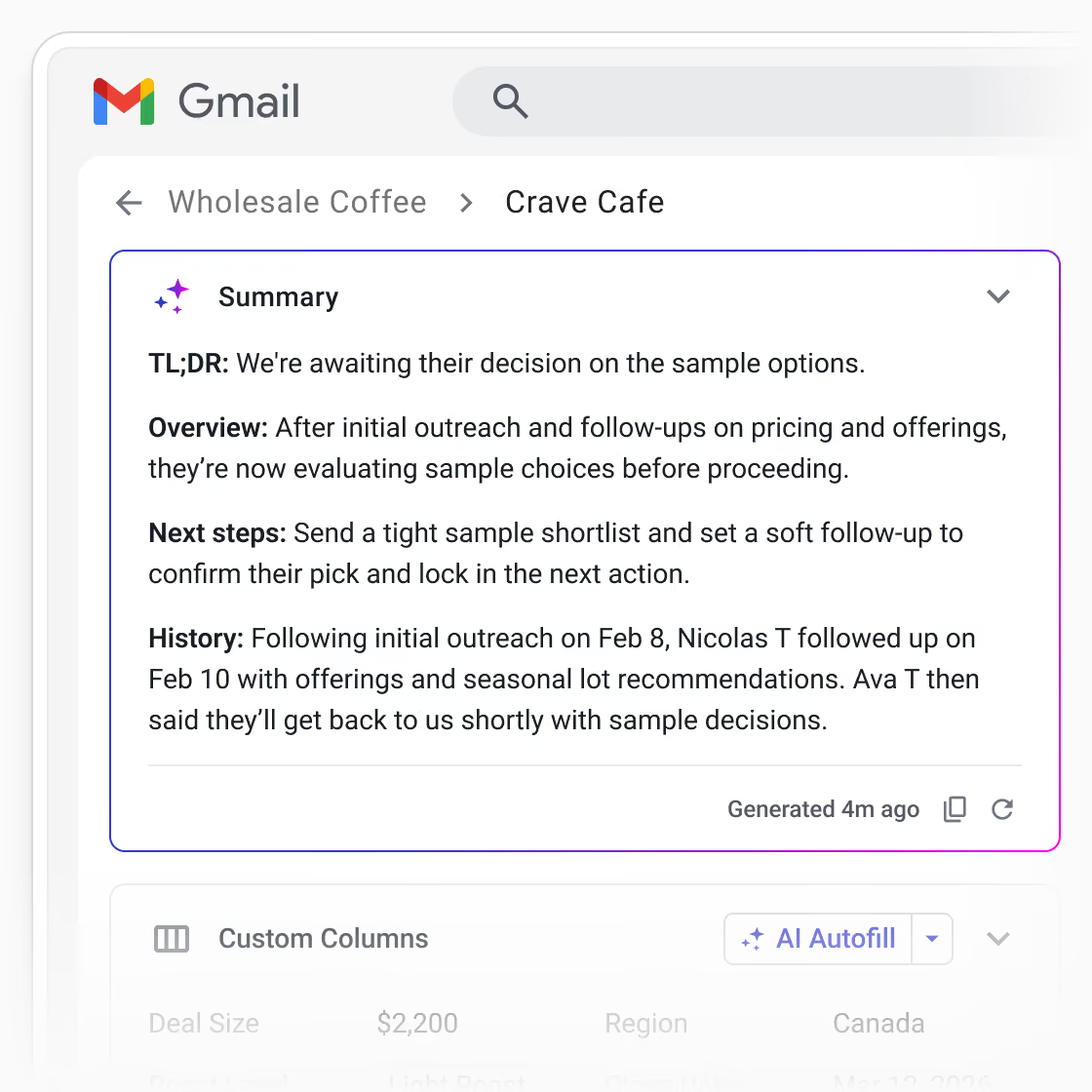
Most CRMs ship a sales assistant that suggests next steps. Streak's pulls the answer straight from the thread — it reads the deal, not just the pipeline.
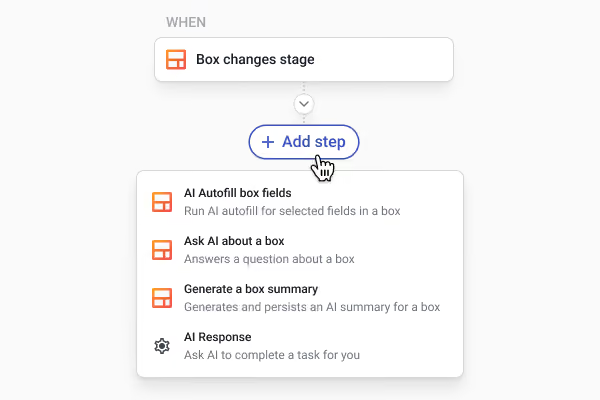
AI workflow automation runs an AI action on its own when something changes in your pipeline — no one has to prompt it. In Streak, that's the AI action step: an AI action you add to an automation, triggered by a pipeline event like a deal changing stage or a new lead arriving.
Because the AI action step lives inside Streak's automation builder, you can chain several steps into one automation — AI actions alongside standard ones like assigning an owner, updating a field, or posting to Slack — so a single pipeline event triggers a full sequence rather than just one action.
For example:
At 1 credit per 10 automation runs, it's highly economical at scale. HubSpot and Zoho offer event-triggered AI too, but only behind Professional or Enterprise tiers; Pipedrive doesn't offer it at all without third party apps and connectors.
This combination — AI workflow automation that's both capable and reachable on an entry paid plan — is the strongest AI claim Streak makes.
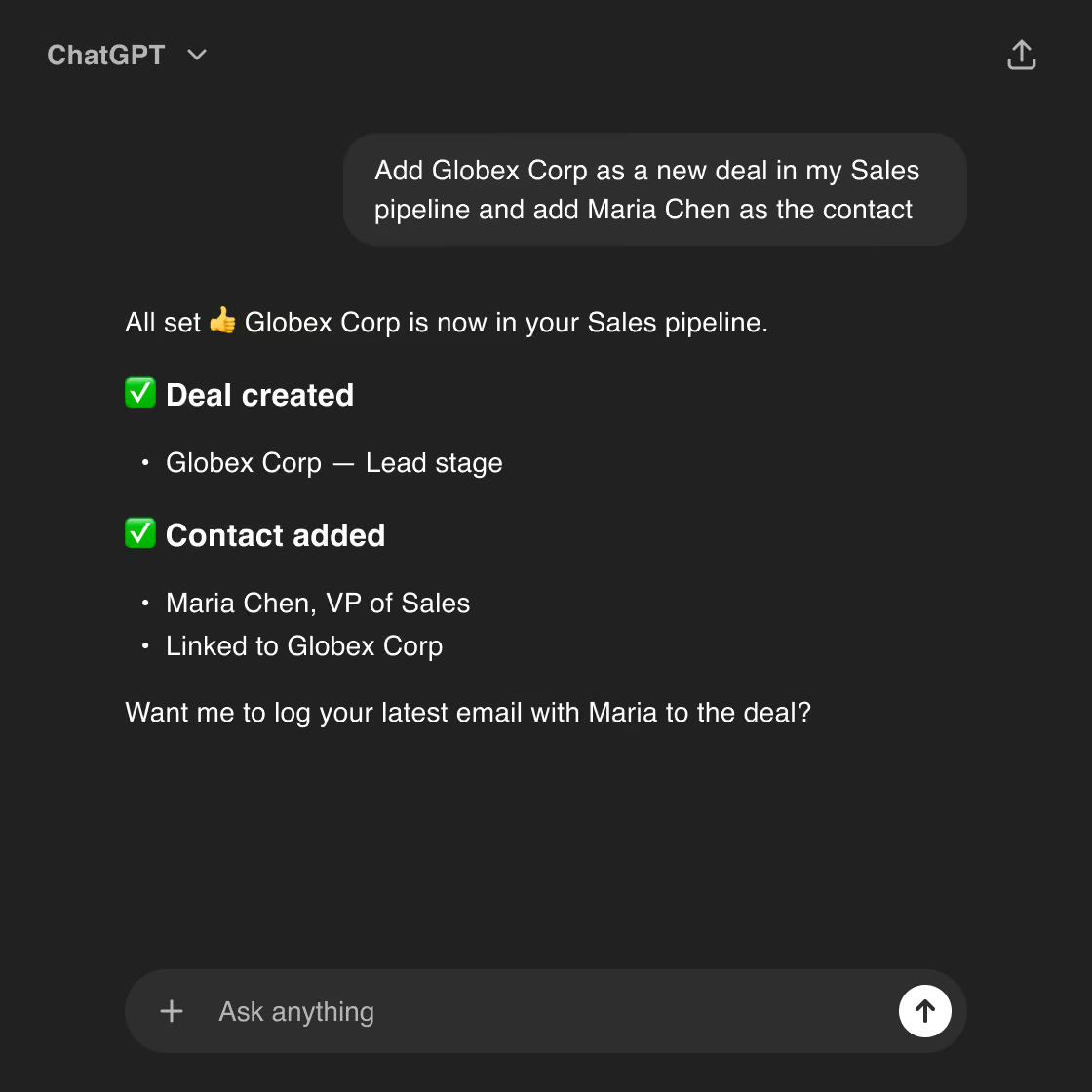
Streak connects to ChatGPT and Claude as apps and exposes an MCP server for any other AI tool. From the tool you already use, you can ask about deals, create tasks, update records, and create custom reports and analytics without opening Streak.

Honest limitation: the entry-level Pro plan includes only 20 AI credits per user per month, which is great for teams who use AI on their most important deals, but goes quickly when a team uses AI across an entire pipeline. Pro+ (150 credits per user) is the practical starting point for teams using autofill regularly, especially when AI workflow automation is used at 1 credit per 10 automation runs.

Breeze is HubSpot's AI layer, and it comes in two parts: the Breeze Assistant, a copilot that drafts and summarizes when you ask, included on Starter plans and up; and Breeze agents, the autonomous workers that do the heavier lifting.
The agents are the deepest in this comparison and the closest of the four to the agentic tier — but they're gated behind Professional subscriptions and a credit system that's hard to predict, so the cost model needs scrutiny before you commit. For a CRM buyer, the two agents worth knowing are the Prospecting Agent and the Data Agent.

Zia is the most analytically capable AI in this group. The thing to weigh isn't price — it's how much data and setup it takes to make that capability pay off.
Zoho is competitively priced, but it's worth considering what it takes to get value out of Zia:
The meaningful AI — predictive scoring, generative features, and Zia Agents — also requires the Enterprise plan. For data-rich teams already all-in on Zoho, that adds up to real value; for a lean team that wants AI working where they already are, it's a lot of setup and commitment before the AI earns its keep.
Pipedrive AI stops at the sales-assistant tier. It's useful for keeping a cluttered pipeline moving, but it's an assistant, not an automation engine.
The AI Sales Assistant analyzes deals and activity to predict win probability and recommend next actions, so a rep opens the pipeline and sees which deals to work today without reviewing each one manually. Beyond prioritization, it drafts emails, summarizes threads, and answers questions about your deals — but that's general-purpose LLM help, not much you couldn't get from connecting your CRM to ChatGPT or Claude directly. AI email writing and summarization sit on the Premium tier ($59 per user per month, annual).
The honest conclusion is the stack cost. Matching the automation depth of the tools above usually means bolting on separate products — a call recorder, an enrichment tool, a sequencer — and wiring them together. The manual-entry burden returns the moment the team outgrows the basics.
Tools differ most on whether the AI tiers that reduce work are actually reachable. HubSpot and Zoho have depth but gate it behind their top tiers; Pipedrive keeps things simple but stops at suggestions. Streak puts both a working sales assistant and event-triggered automation on an entry paid plan.
A note on the pricing row: HubSpot is priced per hub rather than per user, so its entry cost isn't directly comparable on a per-seat basis — and with credits on top, it's typically the highest total cost of the four.
If you want a complete AI sales assistant plus workflow automation that fires on pipeline events — without an enterprise plan or unpredictable credit bills — Streak is the strongest pick of the four. It reads deal context straight from your email and acts on it, and the whole team adopts it inside Gmail with no second app. Pro+ is the practical plan.
If you already run HubSpot and can absorb a usage-based credit system, the Prospecting and Data agents are the deepest in this comparison, and Breeze is the closest to the agentic tier. Set a hard credit cap first.
If you're committed to Zoho and on Enterprise, Zia's predictive scoring and churn detection are the most analytically capable here. Below Enterprise, the AI isn't the reason to choose Zoho.
If your priority is a clean pipeline with prioritization cues and you're willing to add tools for recording, enrichment, and sequencing, Pipedrive's assistant does its job well.
What is AI workflow automation?
AI workflow automation is CRM automation that runs an AI action on its own when something changes in your pipeline — a new lead arriving, a deal moving stage — with no prompt from you. It differs from an AI assistant, which only acts when you ask, and from rule-based automation, which follows fixed if-this-then-that logic: the AI step can interpret context and generate output, like drafting a deal summary, researching a company, or deciding a next step. It's the tier that removes manual work rather than waiting for a request. Streak offers it as the AI action step in automations on Pro+ plans.
What can you do with AI in CRMs?
AI in a CRM can draft and summarize emails, answer questions about your deals, fill in fields from your inbox or the web, score and prioritize leads, and — in the more capable tools — act on pipeline events automatically. The uses fall into three tiers: an AI sales assistant (drafts, summaries, and answers on demand), AI workflow automation (actions that fire on an event without prompting), and agentic AI (multi-step tasks the AI carries out on its own). What you can actually do depends on the tool and plan — most cover the assistant tier, while event-triggered automation and web-research autofill are less common on entry plans.
Does Streak have AI features?
Yes — Streak’s AI acts as a sales assistant and offers AI workflow automation. Streak AI autofills fields from your email thread or the web, writes deal summaries, answers questions about a deal with citations, and builds meeting agendas. For workflow automation, its AI action step fires on pipeline events without prompting. Streak also includes an AI pipeline creator, AI formula fields, and access from ChatGPT, Claude, or any MCP tool — all on a paid plan, no enterprise tier required.
What is the best AI workflow automation in a CRM?
Among these four, Streak. Its AI action step fires on pipeline events without manual initiation and is available on an entry paid plan at 1 credit per 10 runs. HubSpot and Zoho offer event-triggered AI only on Professional or Enterprise tiers, and Pipedrive's automations are rule-based rather than AI-triggered.
Which AI CRM is best for Gmail or Google Workspace teams?
Streak - it runs inside Gmail, reads from a deal's email history, and can trigger AI on pipeline events without leaving the inbox — so there's no second app to manage.
What does an AI sales assistant actually do in a CRM?
An AI sales assistant drafts emails, summarizes threads, and answers questions about deals when you ask it to. It surfaces suggestions and prioritizes your pipeline, but it doesn't act on its own — that requires AI workflow automation or agentic AI.
Stay in the loop with Streak’s latest features and insights.