


.webp)
Opening now...


You’ll need to use a desktop browser to set up your Streak account. You can install Streak now and finish setup on desktop later.
To get started with Chrome, install Streak from the Chrome Web Store on your desktop. Share your email and we'll send you the install link directly.
To get started with Safari, install Streak from the Mac App store on your desktop. Share your email and we'll send you the install link directly.
To get started with Edge, install Streak from the Edge Add-ons store on your desktop. Share your email and we'll send you the install link directly.
If you’ve installed Streak and completed onboarding on desktop, you can install the Streak app to access your pipelines on mobile.


Automations can now fire when new activity or interaction lands in a box, based on magic columns in your pipelines.
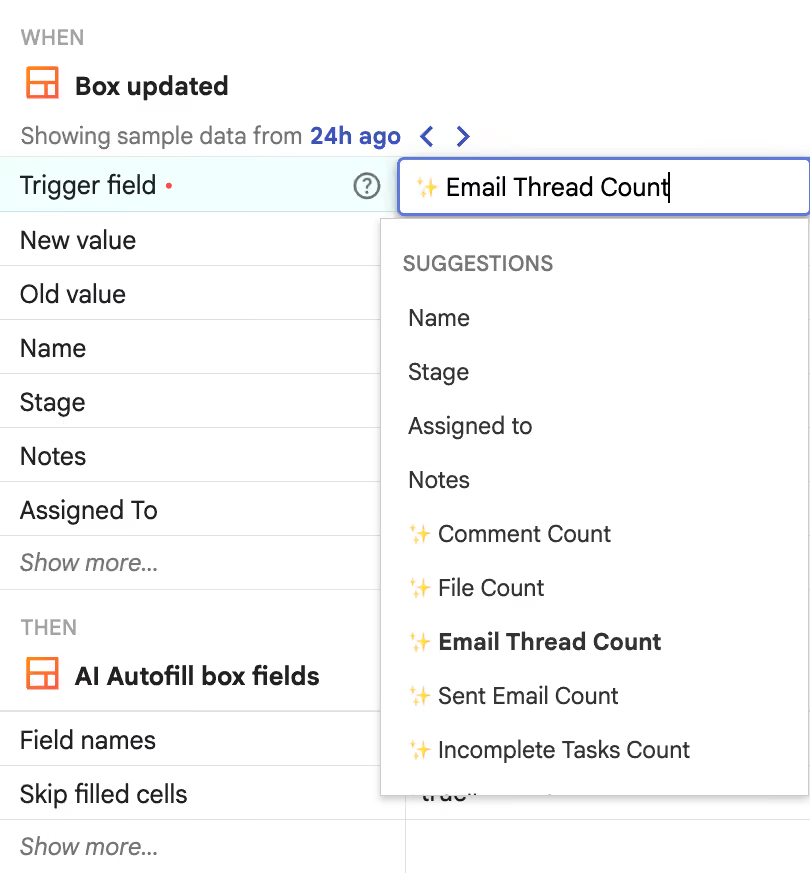
The Box updated trigger accepts magic columns as the trigger field. Choose one and the automation runs when that column updates.
For example, choose Email thread count as the trigger field and AI autofill as the action. Each time a new email is added to a box — automatically, if email sharing is on — the automation runs. Autofill scans the box and its conversation history to fill in the CRM fields with freshly updated information, keeping your pipeline data accurate at all times.
New trigger fields for the Box updated CRM automation:
Each automation watches one trigger field. To follow several kinds of activity, set up one automation per field.
Available on Pro+ and Enterprise plans. Learn more about CRM automations in Streak→


