









Opening now...

You’ll need to use a desktop browser to set up your Streak account. You can install Streak now and finish setup on desktop later.
To get started with Chrome, install Streak from the Chrome Web Store on your desktop. Share your email and we'll send you the install link directly.
To get started with Safari, install Streak from the Mac App store on your desktop. Share your email and we'll send you the install link directly.
To get started with Edge, install Streak from the Edge Add-ons store on your desktop. Share your email and we'll send you the install link directly.
If you’ve installed Streak and completed onboarding on desktop, you can install the Streak app to access your pipelines on mobile.


To track customer meetings, use a CRM with Google Calendar integration so events attach to the right deal automatically. Manual logging is the usual method and the usual failure point, because it depends on every rep entering every meeting by hand. A calendar integration removes that step: past and upcoming meetings appear on the deal on their own.
A CRM is meant to show the real state of every deal, and meetings are the clearest signal a deal is alive. Yet meetings usually live only in a calendar and never reach the CRM. That creates two gaps:
The standard fix — “log every call, write a note after every meeting” — fails because manual entry is tedious and the first habit to slip under load.
Three approaches are common. They differ mostly in how much ongoing effort they take and how complete the record ends up.
For most teams, a calendar integration is the only one that stays complete without daily effort.
A calendar integration reads your calendar and matches each event to a contact or deal already in the CRM. Matched events appear on that record automatically: past meetings as history, upcoming meetings as what’s next. Strong integrations share four traits:
Calendar integrations can vary from CRM to CRM. In order to find one that provides a full information sync and keeps your team's information secure, look for the following features in a calendar sync:
Streak is a CRM that lives inside Gmail, so your inbox, calendar and pipeline are already in one place.
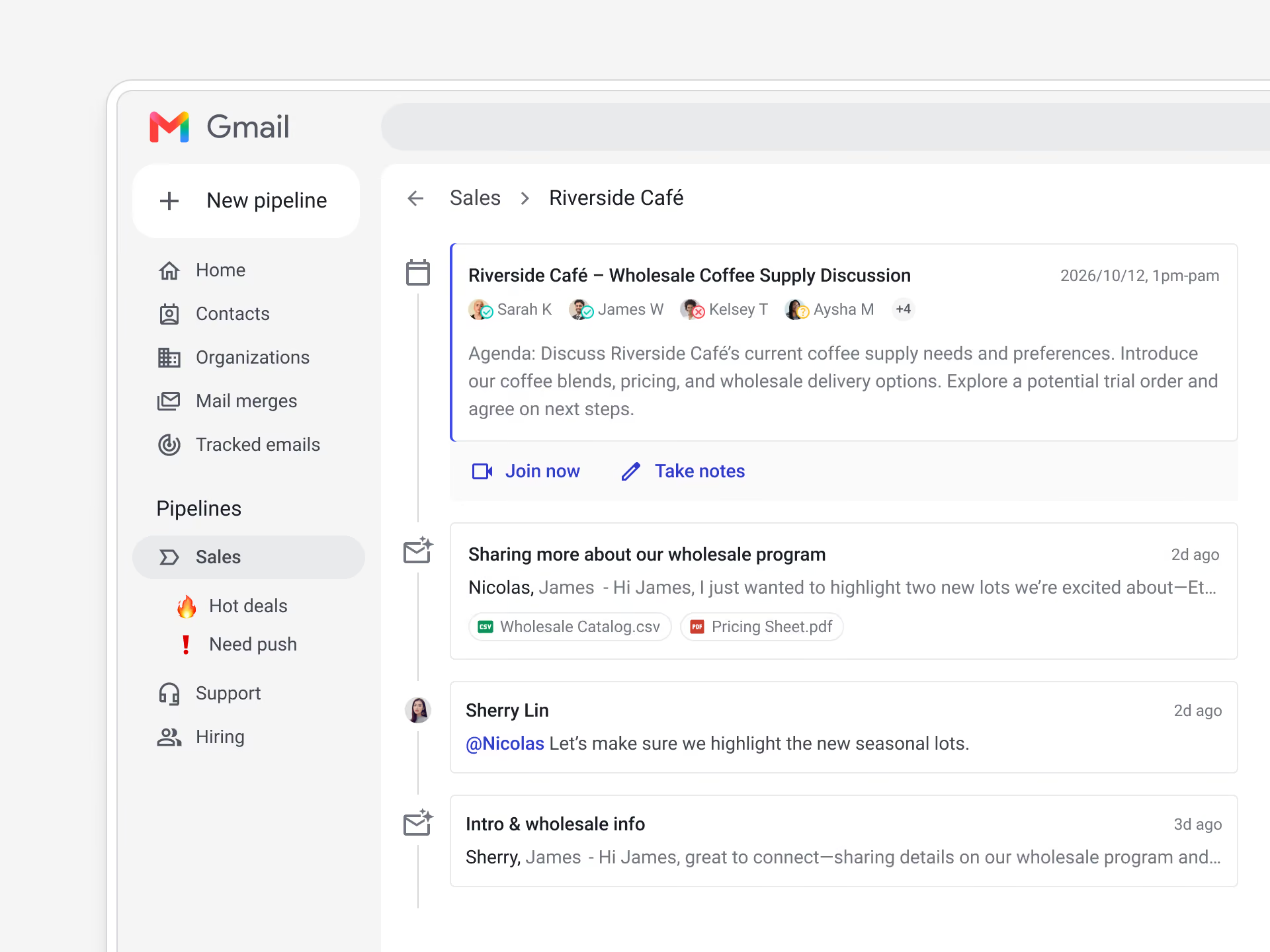
The Google Calendar integration shows meetings on the right deal automatically, matched to the contacts you track.
It pulls events from any teammate with pipeline access, respects your calendar visibility settings, and adds Events columns — Number of events, First event date, Last event date, and Next event date — so you can sort a whole pipeline by meeting activity. Gemini meeting notes and recordings attached to the calendar event appear with it, so the meeting record stays on the deal.
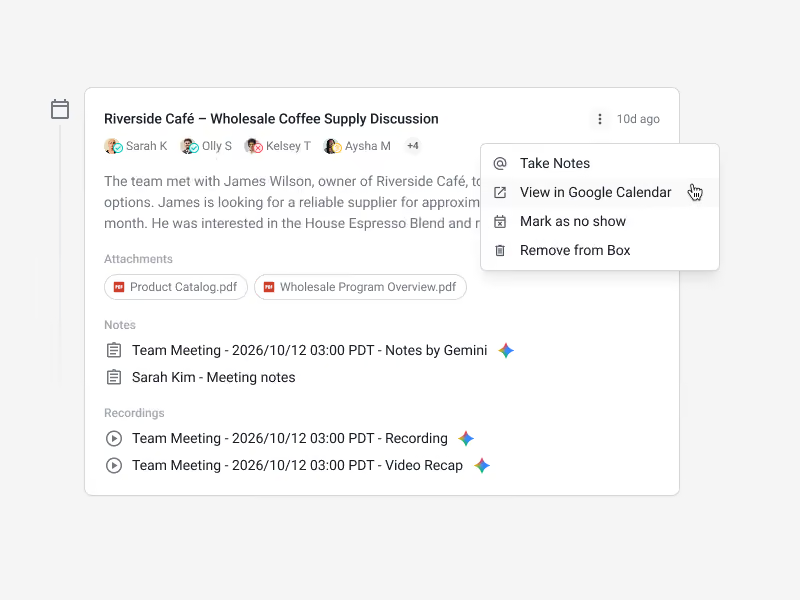
In practice: open a deal and see every past and upcoming meeting in the timeline, with Gemini notes and recordings attached. From your Calendar, open an event to see related deals and jump right to the box in Streak. Sort a pipeline by Last event date to surface deals that have gone quiet, or by Next event date to see the week ahead. Meetings appear without manual logging, and it’s available on all plans.
Use a CRM with a Google Calendar integration, like Streak. It matches events to your contacts and shows them on the deal automatically, so you don’t log meetings by hand.
Several Google Workspace CRMs include calendar sync, including Streak. Streak attaches meetings to the deal and adds pipeline-level meeting columns; check each tool for whether it covers past and upcoming events and teammates’ calendars.
Yes. A calendar integration shows upcoming meetings on the deal, not just past ones, so you know what’s next without leaving the CRM.
Not if the integration respects your calendar visibility settings. Streak follows them, so events marked private aren’t shown.
Use a pipeline column that tracks meeting activity. In Streak, sort by the Last event date column to surface deals that have gone quiet.
Stay in the loop with Streak’s latest features and insights.


