





.webp)
Opening now...

You’ll need to use a desktop browser to set up your Streak account. You can install Streak now and finish setup on desktop later.
To get started with Chrome, install Streak from the Chrome Web Store on your desktop. Share your email and we'll send you the install link directly.
To get started with Safari, install Streak from the Mac App store on your desktop. Share your email and we'll send you the install link directly.
To get started with Edge, install Streak from the Edge Add-ons store on your desktop. Share your email and we'll send you the install link directly.


If you’ve installed Streak and completed onboarding on desktop, you can install the Streak app to access your pipelines on mobile.


A visual pipeline CRM shows your deals organized by stage so you can see where everything stands without digging through lists or email threads. Instead of hunting through scattered notes or spreadsheets, you get a single view that displays which prospects are in initial contact, which are negotiating terms, and which are ready to close.
Visual pipeline CRMs take different approaches to organizing this information. Pipedrive uses drag-and-drop cards that move across columns. Streak displays deals as rows in a spreadsheet-style grid with colored stage headers. Monday offers flexible board layouts that you can customize.
Kanban cards work well for smaller pipelines where you want a visual sense of deal flow. But as the number of deals grows, cards get harder to scan — each one shows limited information, and spotting patterns or stalled deals requires clicking into individual records. A spreadsheet-style view trades the card metaphor for density: more deals visible at once, more data per row, and faster scanning without extra clicks.
Regardless of format, the goal remains consistent: spot bottlenecks, catch stalled deals, and know what needs your attention today — all from a single view.
Small businesses use visual pipeline CRMs to see deal status at a glance without hunting through email chains or spreadsheets. The core job is simple: know what deals are stalled, which ones need action today, and where everything stands.
A visual pipeline eliminates the need for weekly pipeline meetings or manual status reports. When a deal gets stuck in the "proposal sent" stage for three weeks, you spot it immediately rather than discovering it during month-end scrambling.
The real value comes from speed of assessment. Instead of opening individual deal records or scanning through email threads to understand where prospects stand, you get the full picture in seconds. This matters most for solo operators and small teams who can't afford dedicated pipeline management overhead.
Small teams need CRM software that works immediately, not after weeks of setup and training. Effective visual pipeline CRMs for small teams share three key characteristics: installation and basic pipeline creation in under 15 minutes, zero learning curve for daily use, and integration with tools your team already uses daily.
Fast setup means you can create your first pipeline, add deals, and start tracking progress in a single session. Tools like Streak install as a browser extension and build pipelines directly in Gmail — describe your workflow and the AI creates a fully customized pipeline, or pick from ready-made templates for any process. Pipedrive offers pre-built sales pipeline templates that activate with a few clicks.
Zero training overhead eliminates the biggest adoption barrier for small teams. Your CRM should feel familiar from day one — whether that's dragging cards like Trello or editing rows like Google Sheets.
These tools take different approaches to pipeline visualization — from kanban cards to spreadsheet-style grids.
Pipedrive uses kanban-style card boards as the primary view with drag-and-drop deal movement. Monday offers flexible board views including kanban, built on their work management platform. HubSpot provides deal pipeline views in Sales Hub with a free tier that includes basic pipeline functionality.
Zoho CRM defaults to a list/table-style pipeline where deals appear as rows and stages as columns, with kanban available as an optional view mode. Streak creates a spreadsheet-style pipeline directly inside Gmail — deals (called "boxes") appear as rows while stages run across the top as color-coded column groups, with multiple built-in visualization options.
Pipedrive centers its entire interface around a kanban-style card board where deals appear as draggable cards organized by stage. You move deals forward by dragging them from one column to the next. Stalled deals stand out in early stages, while active opportunities cluster in later columns.
The tool requires a separate web app login and tab switching from Gmail, though Gmail sync becomes available starting at the Growth plan ($39/seat/month). Pipedrive works well for dedicated sales teams that spend their day in a CRM rather than living primarily in email.
Pipedrive starts at $14/seat/month annually for the Lite plan, positioning it as an affordable entry point for teams that want purpose-built kanban pipeline management without the complexity of broader platforms like HubSpot or Monday.
Monday's CRM combines visual pipeline management with the flexibility of their work management platform. The pipeline view supports multiple formats including kanban boards, timeline views, and custom layouts that go beyond traditional CRM structures.
The platform excels at customization — you can build boards that track deals alongside project deliverables, marketing campaigns, or support tickets. This flexibility comes with a tradeoff: heavier initial setup compared to purpose-built CRMs like Pipedrive.
Gmail integration syncs emails bidirectionally, though you'll work primarily in Monday's web interface rather than inside your inbox. The visual pipeline includes standard drag-and-drop functionality plus advanced automation rules that can move deals based on custom triggers.
Pricing starts at approximately $12 per seat monthly (annual billing, minimum 3 seats), making it competitive with standalone CRM tools. The platform works best for small businesses that want one tool to handle both sales tracking and broader project management, rather than teams focused exclusively on deal progression.
HubSpot's Sales Hub displays deals in a visual stage-based pipeline where you can drag deals between columns and see your entire funnel at once. The free CRM tier includes this basic pipeline view, making it accessible to small businesses testing visual pipeline tools.
HubSpot combines CRM, marketing automation, and customer support in one platform. Growing businesses often appreciate this unified approach, though small teams focused solely on deal tracking may find the breadth unnecessary.
HubSpot offers a Gmail integration that logs emails and tracks opens, but you still work primarily in HubSpot's web app rather than staying in Gmail. The free plan covers basic pipeline needs, but most small teams quickly hit its limits — sequences, forecasting, and reporting all sit behind paid tiers. Paid plans start around $15-20 per user monthly, but costs escalate fast as you unlock features, and many teams find themselves on plans far more expensive than they expected.
Zoho CRM displays deals as rows in a spreadsheet-style table, with stages organized as columns across the top. This list view is the default pipeline experience — not the card-based kanban format you'll find in Pipedrive or Monday.
The platform does offer a kanban view as an optional mode, letting you switch between list, kanban, and canvas views depending on your preference. Most users stick with the default table format since it shows more deal information at once without requiring card clicks.
Google Workspace integration connects your Gmail, Calendar, Drive, and Sheets, but Zoho runs as a standalone web application — you'll need to open a separate tab to access your pipeline. Teams accustomed to modern interfaces may need more time to adapt to Zoho's design.
The free plan supports up to 3 users but strips out key features — multiple pipelines, workflows, and forecasting all require a paid tier. Paid plans start at $14 per user monthly (billed annually) and add those essentials back. Zoho fits SMBs seeking comprehensive CRM features at a lower price point, particularly those willing to invest time in initial setup.
Streak builds its pipeline directly inside Gmail as a browser extension — no separate app, no new login, no tab switching. Deals appear as rows in a spreadsheet-style grid with color-coded stages for each step in your process.
The pipeline includes multiple built-in visualizations accessible from a dropdown menu. The default "Groupings" view shows stage headers with deal counts — your pipeline at a glance. Switch to pie, bar, line, column, or combo charts to see trends and totals without leaving the pipeline view or opening a separate reports dashboard.
Streak calls deals "boxes" and uses magic columns that auto-update based on email activity. When you send or receive emails, they automatically log to the relevant box. Update deal stages by editing cells directly in the grid — no dragging cards around.
The free plan includes email tracking and snippets but no shared pipelines. The Pro plan at $49/user/month unlocks shared pipelines, mail merge, and AI features. Streak works best for Gmail-heavy small teams and solo operators who want pipeline visibility and complete email integration without adopting a separate CRM platform.
Pipedrive and Monday use kanban card layouts where you move visual cards between columns. HubSpot provides stage-based pipeline views with different visual organization.
Zoho CRM defaults to a spreadsheet-style list with stages as columns, though kanban is available. Streak takes a unique approach with its Gmail-native spreadsheet view plus multiple chart visualizations (pie, bar, line charts) built directly into the pipeline view — no separate reports dashboard needed.
Installing Streak takes two minutes. Add the Streak extension to Safari or Chrome, refresh Gmail, and a pipeline appears in the left navigation — build one from scratch, describe your workflow to build a customized pipeline with AI, or start from a template.
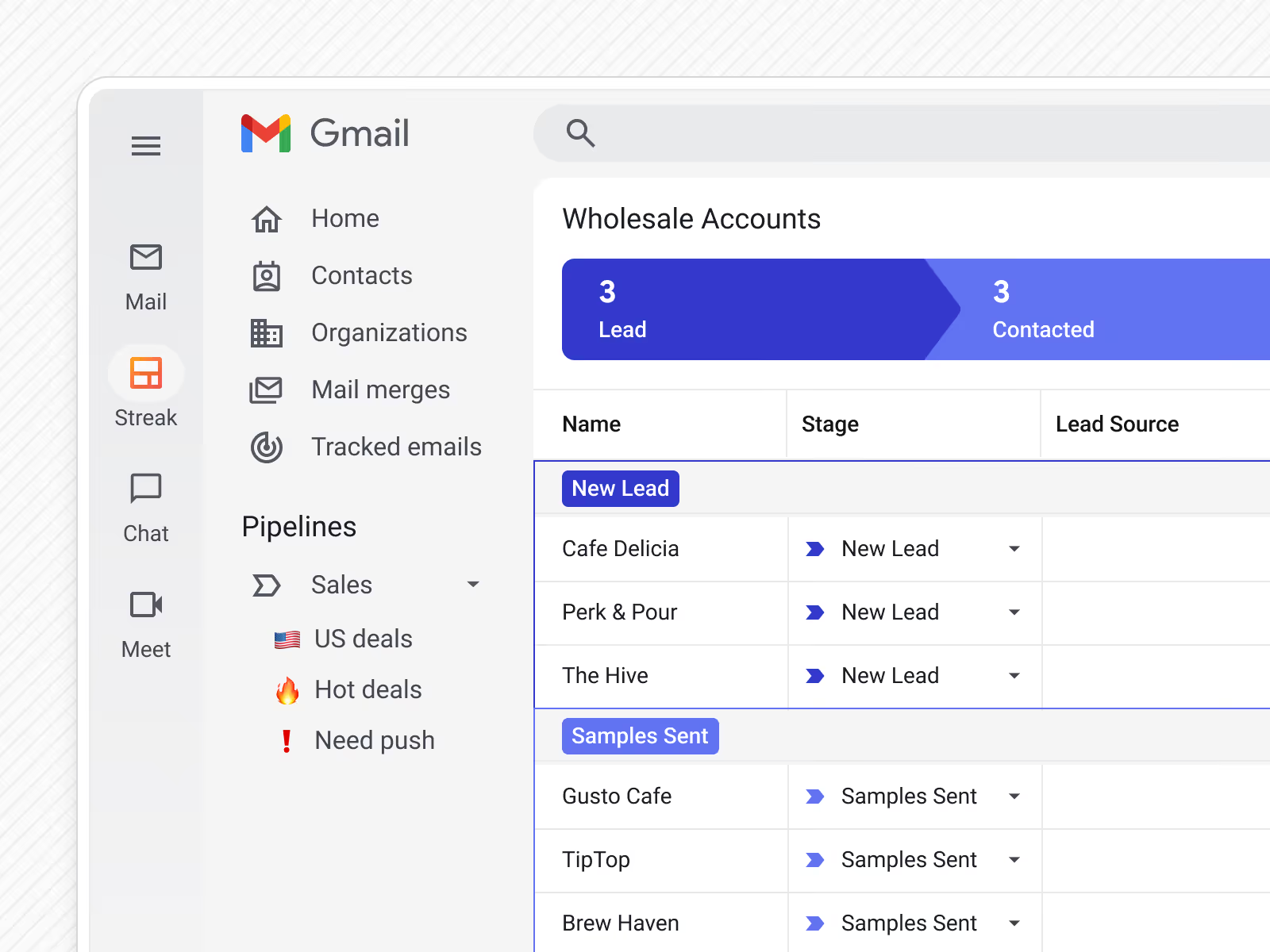
Click your pipeline name and deals (which Streak calls "boxes") appear as spreadsheet rows. Stages run across the top as color-coded headers that show how many deals sit in each stage. This "Groupings" view is the default — it's Streak's version of a visual pipeline without kanban cards.
Switch between seven built-in visualizations from the pipeline menu: pure spreadsheet (No Visualization), the default Groupings view, or charts — pie, bar, line, column, combo. These aren't reports; they're different ways to see the same pipeline data without leaving the view.
Update a deal stage by editing the row directly or using dropdown menus. No dragging cards between columns. When you email a contact, Streak automatically logs that email to the right box. Reply to a deal-related email and Streak shows the full conversation history alongside your pipeline data.
The entire workflow happens inside Gmail. Open a deal email, check the pipeline, update a stage, send a follow-up — all without switching tabs or apps. Your sales process stays where your email lives.
Pipedrive fits dedicated sales teams that want classic kanban cards with drag-and-drop deal movement. If your team thinks in terms of "moving deals through stages" and prefers the visual metaphor of cards on a board, Pipedrive delivers that experience cleanly without extra complexity.
Monday works for teams that need a flexible work management platform, not just CRM. Choose this if you want to manage projects, tasks, and client relationships in one place with customizable boards and workflows.
HubSpot serves teams that need CRM plus marketing automation in one platform and want a free starting point. The free tier gives you basic pipeline functionality, making it a low-risk entry point for growing businesses that plan to add marketing tools later.
Zoho CRM targets SMBs that want feature-rich functionality at an affordable price with flexible view options. The free plan supports up to 3 users, and paid plans start at $14/user/month while offering both list and kanban pipeline views.
Streak is built for Gmail-heavy small teams and solo operators who want pipeline tracking without leaving their inbox. If your team practically lives in Gmail and you want deal management that feels like an extension of email rather than a separate app, Streak eliminates the context switching entirely.
Streak for Gmail users — install the browser extension in under two minutes and your pipeline appears directly in your inbox. No new interface to learn, no separate login, no tab switching between email and deals.
Pipedrive wins for teams that want a dedicated kanban tool outside of Gmail. The drag-and-drop card interface is intuitive, but you'll need to train your team on a new platform.
Yes, but only with Streak. The pipeline lives inside Gmail as rows and color-coded stage columns — deals, follow-ups, and visualizations all appear in your left sidebar. Update deal stages by editing cells directly, switch to chart views from the pipeline menu, and emails automatically attach to the right deals.
Other CRMs offer Gmail integration, but require you to work in their separate web app.
Pipeline view means any stage-based deal tracking system. Kanban refers specifically to the card-and-column visual format popularized by tools like Trello.
Some CRMs default to kanban cards (Pipedrive, Monday), while others use list/grid formats (Zoho's table view, Streak's spreadsheet-style rows). Streak includes multiple chart visualizations — pie, bar, line — built into the pipeline itself, not buried in a separate reports section.
No. HubSpot's free plan includes basic deal pipeline views, and Zoho CRM is completely free for up to three users with full pipeline functionality.
Streak's free plan covers email tracking and templates but requires Pro ($49/user/month) for shared pipelines. The investment pays off if your team lives in Gmail and wants zero-friction deal tracking.
Stay in the loop with Streak’s latest features and insights.


