






.webp)
Opening now...

You’ll need to use a desktop browser to set up your Streak account. You can install Streak now and finish setup on desktop later.
To get started with Chrome, install Streak from the Chrome Web Store on your desktop. Share your email and we'll send you the install link directly.
To get started with Safari, install Streak from the Mac App store on your desktop. Share your email and we'll send you the install link directly.
To get started with Edge, install Streak from the Edge Add-ons store on your desktop. Share your email and we'll send you the install link directly.


If you’ve installed Streak and completed onboarding on desktop, you can install the Streak app to access your pipelines on mobile.


At some point in building out a B2B sales workflow, most teams hit the same wall: the contact list is there, but the data isn't. Missing emails, outdated job titles, no sense of whether a company even fits your ICP.
That gap — between a name on a list and a contact you can actually reach — is the data enrichment problem.
Clay has become a go-to for this, and for good reason: it runs your contact list through 150+ data providers in sequence and has solid AI research capabilities. But it's built for teams with a dedicated outbound motion and someone to manage the tool and setup.
For everyone else, the cost and complexity can be harder to justify.
This post is for teams already using — or considering — a Gmail-based CRM like Streak, who want to know whether Clay is worth adding on top. We'll cover what each tool actually does, where Clay wins, and where Streak's data enrichment and AI Autofill with web research can accomplish similar results.
{{cta-box-no-btn}}
Before comparing tools, it's worth understanding the underlying problem both are solving. How a team sources leads shapes how much enrichment work they need. This typically varies by the size and type of team.
High-volume outbound teams typically start from LinkedIn Sales Navigator exports, Apollo's prospecting database, conference attendee lists, or scraped directories. These sources give you names and companies — but rarely verified email addresses, direct phone numbers, or reliable firmographic detail.
Smaller B2B teams and solo founders tend to work differently. Leads often come in through inbound inquiries, referrals, LinkedIn conversations, or a short list of target accounts they're working manually. The enrichment need is real — they still want to know a company's industry, size, and whether the contact is a good fit — but the volume and tooling required is much lower than an SDR team running thousands of outbound sequences.
This distinction matters because it's where Clay and Streak's AI Autofill start to diverge.
Clay is purpose-built for the first scenario: bulk enrichment at volume, pulling from 150+ providers to fill gaps before leads ever reach a CRM. Streak is built for the second: enrichment that happens inside your pipeline, on the contacts and deals you're already managing.
Clay is a data enrichment and workflow automation platform built primarily for outbound sales teams. It acts as a central hub where you can import, enrich, and export lead lists to CRM systems.
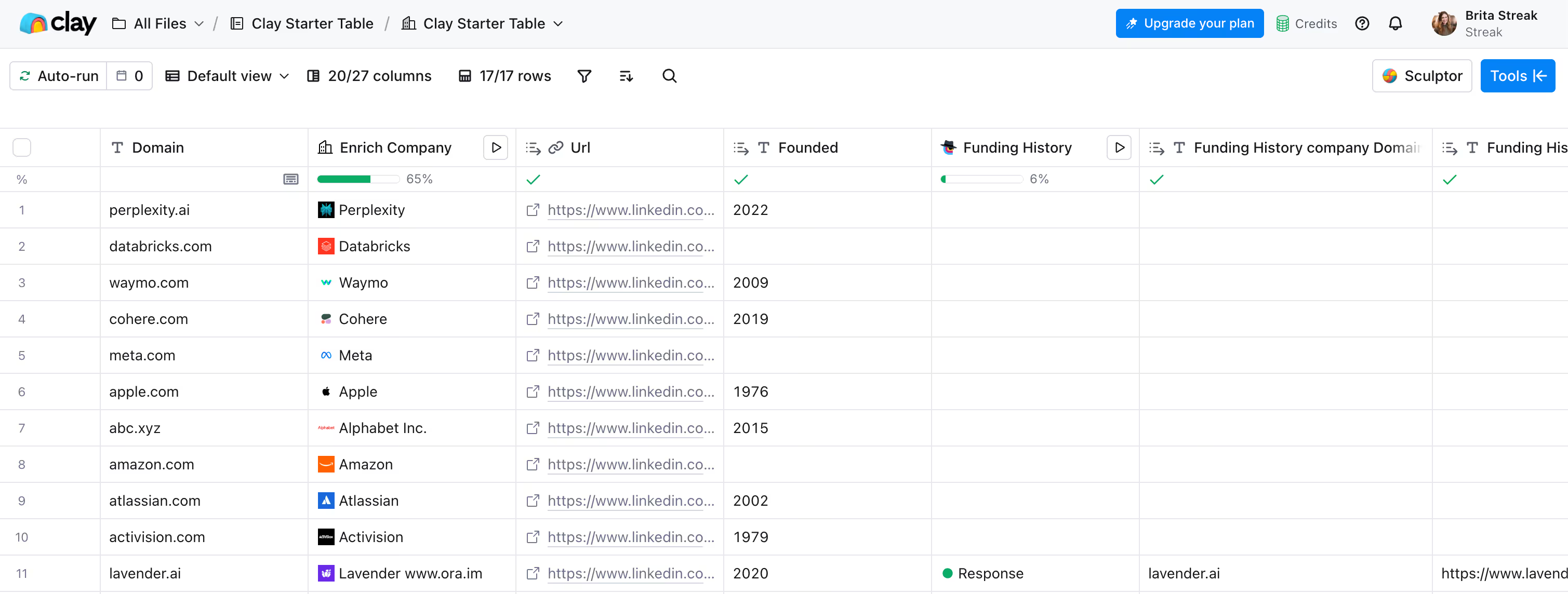
Clay is designed for teams that want to build prospecting lists, enrich them at scale, and push clean data into a sending tool or CRM. It sits before your CRM in the workflow — not inside it.
Clay overhauled its pricing structure on March 11, 2026. Current plans:
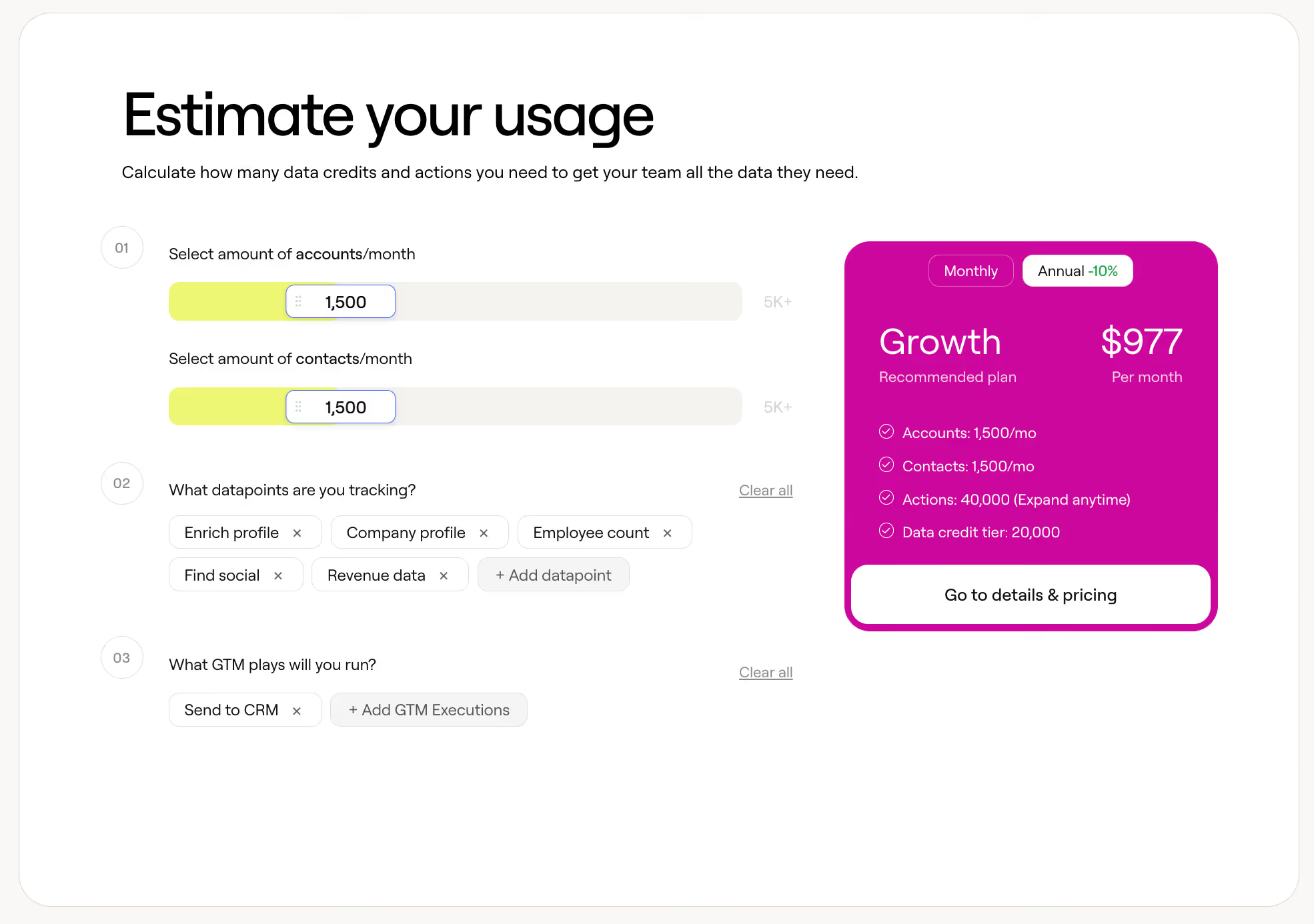
A few things worth understanding about the cost:
Credit systems: Clay uses a dual credit system. Data Credits pay for enrichment data from third-party providers; Actions cover platform operations (workflow steps, CRM pushes, AI calls).
Variable costs: Data Credits are the real variable cost — and they scale quickly on high-volume pipelines, particularly when querying multiple providers per record in a waterfall sequence.
Integrations available in higher tiers: CRM integrations (HubSpot, Salesforce) require the Growth plan at $495/month. Below that, syncing enriched data back to your CRM requires manual exports or Zapier workarounds.
One more thing worth factoring in: the subscription price is often not the full cost. Independent analyses estimate that the platform subscription covers only 40–60% of total actual spend for active users — the rest comes from credit top-ups during high-volume months, and potentially LinkedIn Sales Navigator ($99/user/month) if LinkedIn enrichment is part of your workflow.
For teams evaluating budget, be sure to model the full stack cost rather than the plan fee alone. Clay offers a handy pricing calculator to estimate your monthly costs.
Streak is a CRM built natively inside Gmail. Unlike Clay, which sits outside your CRM as a separate enrichment layer, Streak enriches data directly inside the pipeline where you're already managing deals. There are four ways this happens.
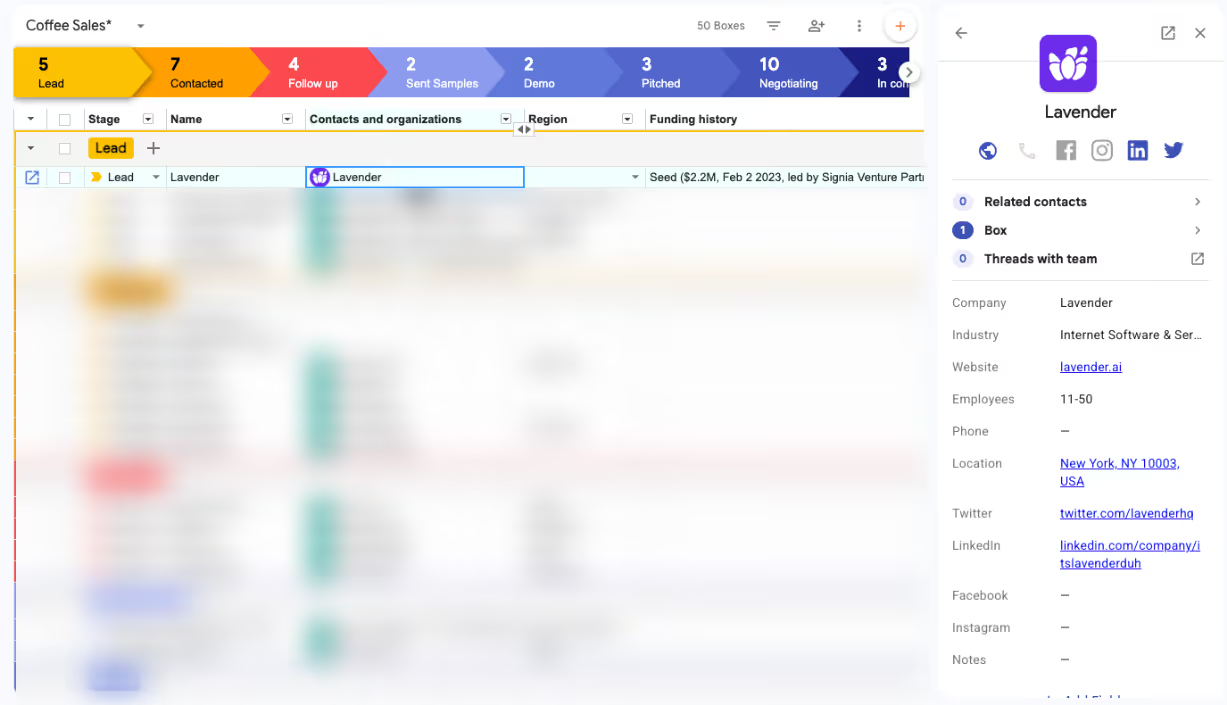
When you add a contact or organization to Streak, Streak automatically pulls available structured data using tools like Clearbit and Mixrank. This typically includes company name, industry, employee count, location, website, and social media links (Twitter/X, LinkedIn, Facebook, Instagram).
This happens immediately, requires no prompt, and draws no credits. It's part of the CRM, not an AI feature.
This covers the basics that most sales teams need when a new lead enters the pipeline. You need to start with a contact’s email address, but don't incur additional costs to enrich leads.
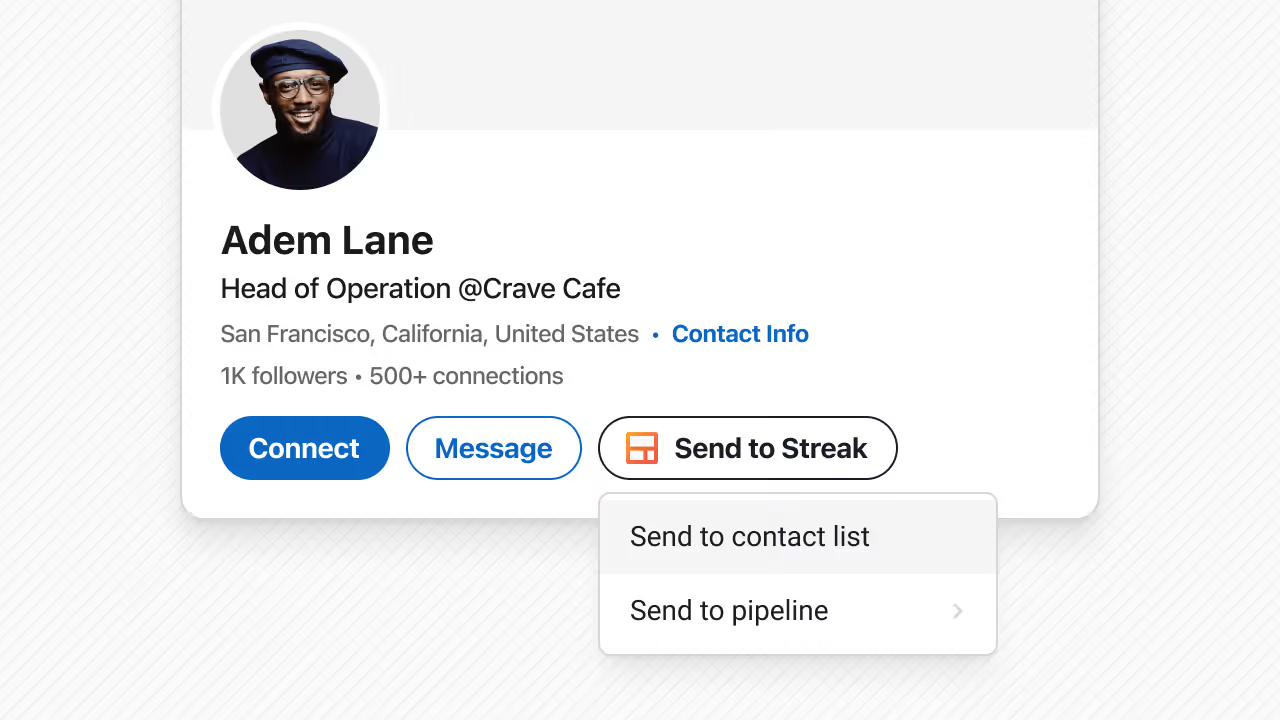
If your prospecting starts on LinkedIn, Streak's LinkedIn integration adds a "Send to Streak" button directly to LinkedIn profiles. One click creates a contact or pipeline record pre-populated with name, role, company, LinkedIn URL, and email when available. You can also see whether someone is already in your CRM while browsing — so you never duplicate outreach or step on a teammate's deal.
Clay is capable of bulk-enriching a list you've already built. Streak is better at capturing prospects as you find them — in the environment where you're already doing the research.
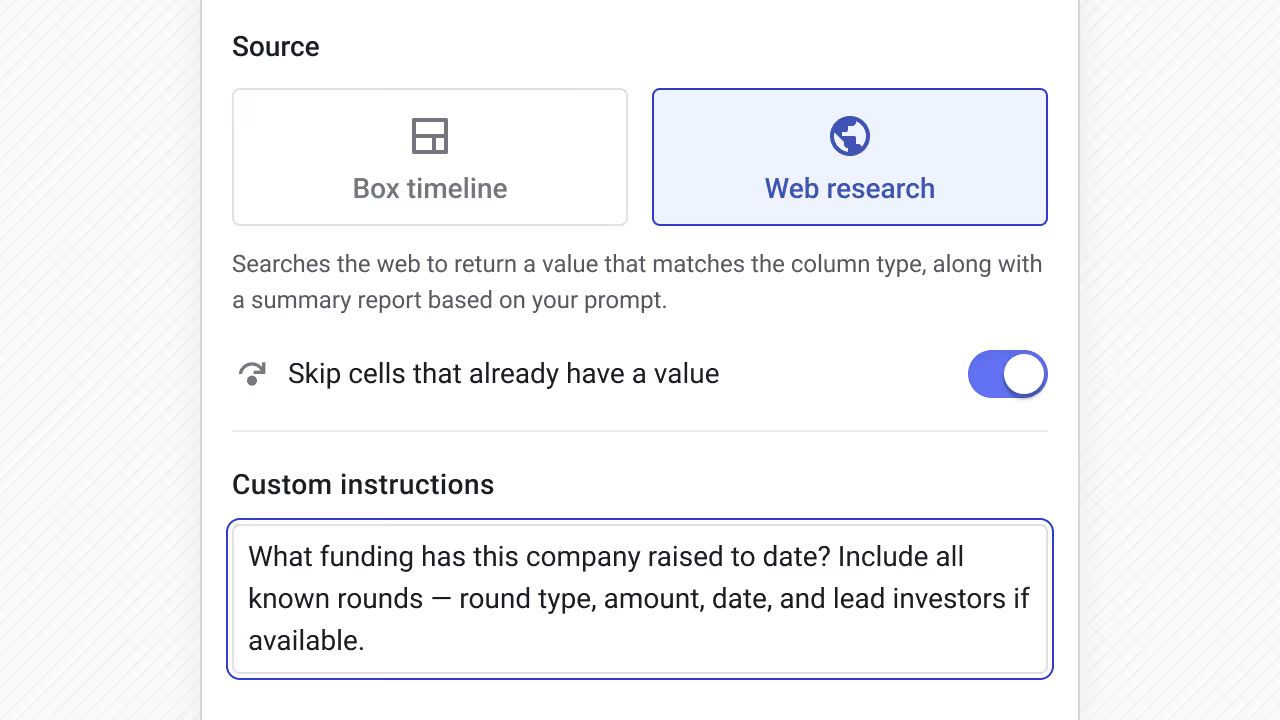
Streak's AI Autofill with web research lets you write a custom prompt on any CRM field and Streak searches the web and fills it automatically. This is where Streak directly covers what teams use Clay's Claygent for: researching ICP fit, company positioning, funding stage, personalized cold email openers, tech stack signals. The difference is that it runs inside your CRM on your existing pipeline — not in a separate spreadsheet you then have to sync back.
You can run it on a single record or in bulk across your entire pipeline at once. You can also trigger it automatically via automations when a deal reaches a certain stage or a field is updated.
AI web research costs 2 credits per field run, drawn from your plan's shared credit pool.
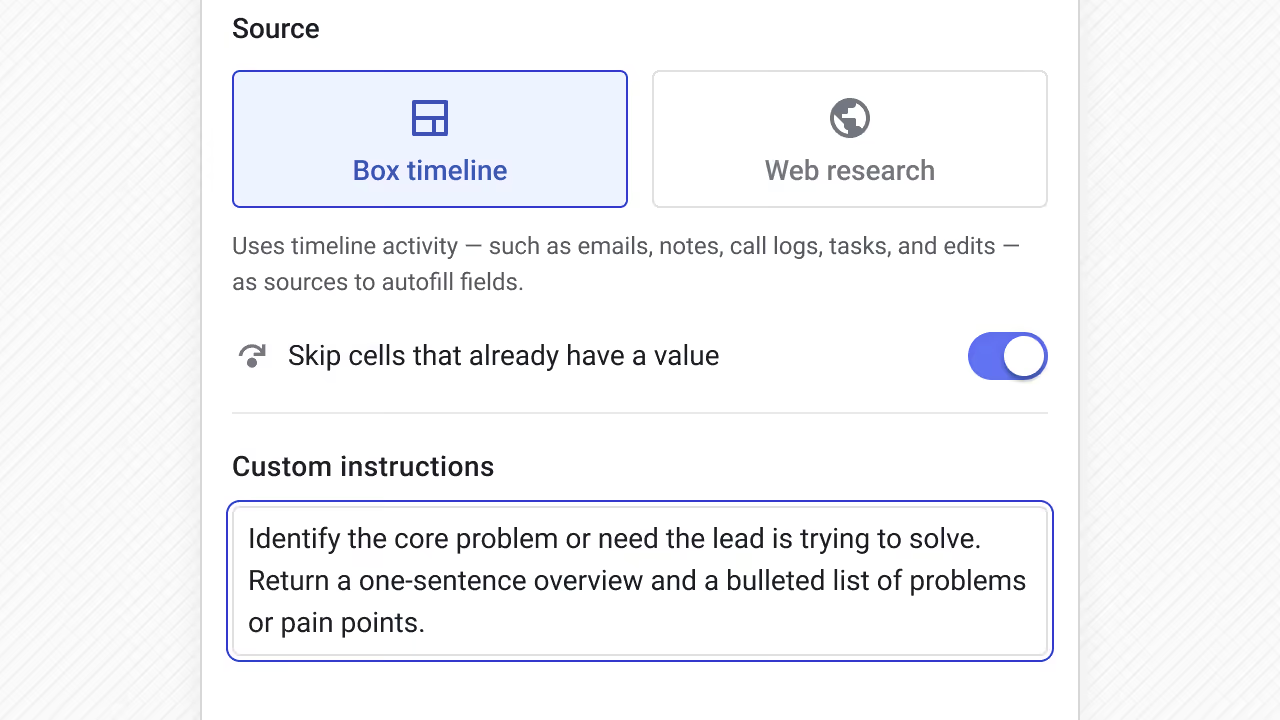
This is the capability Clay doesn't have. Autofill can read your actual deal conversations — emails, call notes, meeting logs — and extract structured data from them. Fields like "Pain point mentioned," "Next steps agreed," "Budget confirmed," or "Decision maker identified" can be filled from what was actually said in your threads, not from a public web search.
Most CRM data goes stale because updating it requires reps to remember to do it manually. Autofill does it for them, from the conversations that are already happening. Clay has no access to your inbox — this is a capability that only a CRM with native email integration can offer.
Deal timeline enrichment costs 1 credit per field run.
Streak's AI features run on a shared credit pool included in each paid plan. Current plans at streak.com/pricing:
Credits are shared across all AI features — Autofill, AI Summaries, and AI Q&A all draw from the same pool. Each deal timeline-based Autofill run costs 1 credit; web research Autofill costs 2 credits per field run.
For teams using Autofill as a regular part of their workflow, Pro+ is the right tier — 150 credits/user/month covers meaningful enrichment volume at 2 credits per web research run without hitting the limit mid-pipeline. Pro is available for lighter usage, and Enterprise covers teams running Autofill at scale.
If you exceed your monthly allocation, additional credits can be purchased in add-on packs:
This is the question that most comparisons skip. Both Clay and Streak Autofill do some form of "AI research" — but they're solving different data problems.
Clay's waterfall queries structured B2B databases — proprietary records compiled by companies like Apollo, Clearbit, and PeopleDataLabs. This data includes:
This data doesn't come from public websites. It comes from aggregated, licensed datasets that these providers have built over years.
Streak also draws on structured data providers like Clearbit and Mixrank for its automatic contact and company enrichment — including providers that aggregate data from 50+ sources. The key difference is how the enrichment is triggered and structured: Clay's waterfall queries multiple providers in sequence at scale, optimizing for coverage across a large list. Streak's enrichment runs automatically when you add a contact or company, covering the standard fields most teams need without any configuration.
Both Streak Autofill and Clay's Claygent agent do open-web research — visiting public pages, reading them, and summarizing the relevant information. This is useful for:
The honest comparison: If you need verified phone numbers and high-volume waterfall coverage for cold outbound at scale, that's still a database coverage problem Clay is built to solve. If you need industry context, personalized openers, ICP qualifiers, and contact-level data when prospecting from LinkedIn or adding contacts by email, Streak covers that without a separate tool or subscription.
We ran four side-by-side experiments on the same company — Lavender (lavender.ai), a real B2B SaaS company — using the same inputs in both tools. Here's what we found.
What we did: Added Lavender to both tools with no manual input — no prompts, no extra steps.
Clay used its Enrich Company step (cost: 0.5 credits/row, can increase depending on data type) and returned structured database data: exact employee count (132), revenue range ($10M–25M), founded year (2020), LinkedIn follower count, and a company description pulled from LinkedIn.
Streak automatically populated company name, industry, employee band, location, website, and social media links — at no credit cost, on import.
Takeaway: Clay returns richer structured data on import, drawing from proprietary databases. Streak covers the basics automatically and for free. The more important difference: Clay charged 0.5 credits per row for this step. At 500 companies, that's 250 credits before any AI research runs. Streak's contact and organization data enrichment draws nothing from your plan.
Prompt: "What funding has this company raised to date? Include all known rounds — round type, amount, date, and lead investors if available."
Clay (Claygent, 3 credits) cross-referenced PR Newswire, TechCrunch, and FinSMEs. It found 2 rounds totalling $13.2M and flagged a TechCrunch discrepancy ($14.2M) as a likely error. Output: structured database fields.
Streak (AI Autofill web research, 2 credits) returned the same result — $13.2M total, same two rounds, same investors, same dates — with numbered citations linking to sources. Result saved directly to the CRM pipeline field.
Takeaway: Data quality was equivalent. Both tools flagged the same source discrepancy — a sign that both are doing genuine web research, not pulling from a static database. Streak was noticeably faster. Clay's output is more structured and filterable; Streak's is more immediately readable for a sales rep reviewing a deal.
Prompt: "I'm a wholesale coffee business that sells beans to corporate offices for their coffee service along with cafes, restaurants, and sometimes events. Research the company and write a one-sentence personalized cold email opener."
Clay (Claygent, ~4 credits) Opener: "Congrats on your $11M Series A—if you're expanding teams post-funding, we can keep your offices energized with reliable weekly deliveries of freshly roasted beans and equipment support." Note: Clay's prompt builder automatically optimized the prompt before running, which improved results. Without that optimization step, the output was not usable as a cold email intro line.
Streak (AI Autofill web research, 2 credits) visited the homepage and used Lavender's core product positioning. Opener: "Saw Lavender helps sales teams write better emails faster with AI coaching, and it seemed fitting to reach out because great office coffee can play a surprisingly similar role in keeping high-performing teams sharp and energized.”"
Takeaway: Both produced genuinely personalized, usable openers. Streak's used core product positioning rather than a recent event.
Prompt: "I sell wholesale coffee beans to corporate offices for employee coffee perks, and to cafes, restaurants, and event venues. My ideal customer has 20+ employees, values quality coffee as part of their culture, and has budget for premium office perks or runs a high-volume food and beverage operation. Is this company a good potential customer? Answer Yes or No and give a two-sentence reason."
Clay (Claygent, 3 credits): No. "Lavender’s team is reported as 16 employees, below the 20‑employee threshold, and its website shows no office coffee perks or food‑service operations. Consequently, it does not meet the criteria for a wholesale coffee bean customer." Visited lavender’s site and a TechCrunch article. Note: Clay's own enrichment showed 132 employees, but its Claygent response cited 16 — a discrepancy between its database data and web research output worth flagging.
Streak (AI Autofill web research, 2 credits): No. "No — Lavender has the likely employee count and funding to afford premium office perks, but it is a software company rather than a food-and-beverage operator, and there is no clear public evidence that quality coffee is a meaningful part of its culture.” Visited the Lavender site along with articles from Crunchbase, PR Newswire, and GetLakta.
Takeaway: Both reached the same conclusion using genuine reasoning — visiting Lavender’s site and third-party sources rather than just checking the industry tag. Clay's output included incorrect information about the number of employees at Lavender. Streak was faster across every experiment.
For teams reaching out to 500+ new leads per week who need verified emails and phone numbers, this coverage matters. Waterfall enrichment across multiple sources can increase enrichment rates.
Clay is purpose-built for teams running cold email at scale through tools like Instantly and Smartlead. These are dedicated cold email platforms — built specifically for managing high-volume outreach across many sending mailboxes, with features like automated inbox warmup, deliverability monitoring, and sending throttling. Clay integrates natively with these tools and has recently built its own native email sequencer, pushing enriched and personalized leads directly into sequences. If your primary motion is SDR-led cold outbound at volume, Clay fits that workflow more directly than a CRM-first tool.
Clay's learning curve is real. Clay users report needing weeks, months, or even years to feel comfortable with Clay's capabilities, and most teams that use it well either have dedicated internal technical ownership or hire an agency to run it. The flexibility that makes Clay useful for advanced workflows also makes it more complex to configure and maintain. Without someone to own it, the tool often underperforms its potential.
Clay offers real-time signal tracking — job changes, website visits, LinkedIn activity — that can automatically trigger enrichment when a prospect takes a relevant action. If signal-based outbound is part of your motion, this is a meaningful capability that goes beyond what CRM-native enrichment does.
For most small teams and solo founders, the enrichment problem isn't "I need verified phone numbers for 500 contacts." It's "I need to understand ICP fit, company size, and a relevant angle for outreach." Autofill handles all of this with a single prompt per field — industry, pricing model, a personalized opener — without adding another tool to maintain.
When you add contacts by email, Streak automatically pulls in available structured data — company, role, and firmographic details. And the LinkedIn integration lets you create enriched CRM records directly from LinkedIn profiles — name, email when available, role, company, and LinkedIn URL — without leaving the browser.
If your prospecting workflow runs through LinkedIn — which is true for many B2B sales teams — Streak's LinkedIn integration removes a significant friction point.
For teams prospecting from LinkedIn, this is the point where the comparison with Clay shifts significantly. Clay is better at bulk-enriching a list you've already built. Streak is better at capturing individual prospects as you find them — in the environment where you're already doing the research.
With Clay, you enrich in a spreadsheet and then sync back to your CRM. That's an extra step at an additional cost. With Streak’s AI Autofill, enrichment happens inside the pipeline where you're already working. When you open a deal, the enriched data is already there — not in a separate table you need to keep synced.
Autofill can read your deal timeline — emails, call notes, meeting logs — to fill fields based on actual interactions with your leads and prospects. If a prospect mentioned a budget constraint in a call two weeks ago, Autofill can surface that when you update a field. Clay doesn't have access to your inbox or call notes. For relationship-driven sales, this is the more relevant data source.
Streak has mail merge built into Gmail. Autofill or AI Q&A can generate a personalized intro line per contact, which you insert as a variable in a mail merge template — sent directly from Gmail. No separate cold email tool required for teams doing moderate outbound.
Clay
Pros:
Cons:
Streak AI Autofill
Pros:
Cons:
Do I need Clay if I already have a CRM?
Not necessarily. Clay adds clear value when you need verified emails and phone numbers at scale — data that only exists in proprietary B2B databases and can't be retrieved by web search. If your enrichment needs are more qualitative (ICP fit, company context, personalized openers), a CRM with built-in AI enrichment like Streak's AI Autofill typically covers those jobs without the added cost and setup. It's also worth noting that Streak automatically enriches contacts and companies with structured data — industry, employee count, location, social links — at no credit cost when you add a record, before any AI features come into play.
What's the difference between Clay's waterfall enrichment and AI web research?
Waterfall enrichment queries proprietary B2B databases — Apollo, Clearbit, PeopleDataLabs, and 145+ others — for structured contact data: verified emails, direct phone numbers, firmographics. This data doesn't come from public websites. AI web research (Clay's Claygent and Streak's Autofill) browses public pages to surface qualitative context: company positioning, ICP signals, recent news. The two solve different problems — waterfall for contact data coverage at scale, web research for context and qualification that doesn't exist in structured databases.
Is Clay worth it for small teams?
For most small teams, no. Clay's economics work at volume — the Growth plan ($495/month) is the minimum tier with CRM sync, and annual plans run from $2,000/year (Launch) to $5,300/year (Growth) before credit top-ups. Without a dedicated outbound motion and someone to own the setup, the tool rarely pays for itself. Teams doing relationship-based selling, inbound follow-up, or moderate outbound in Gmail will find a CRM with built-in AI enrichment covers the same practical needs at a fraction of the cost.
Can Streak replace Clay for lead enrichment?
For most small and mid-sized B2B teams, partially. Streak's AI Autofill covers the web research layer that Clay's Claygent handles: ICP fit, company context, industry, tech stack, personalized openers. What it doesn't replace is Clay's waterfall enrichment across 150+ proprietary databases for verified emails and phone numbers at high match rates. If contact data coverage at volume is your primary need, Clay still has an edge. If you need research and context on deals you're already managing, Streak handles it without adding a separate tool.
Can I use Streak AI to write personalized outreach at scale?
Yes. Add a "Personalized opener" field to any pipeline with a prompt like: "Write a one-sentence opening line for a cold email referencing something specific from this company's website or recent news." Autofill runs the research and fills the field for every contact. You can then insert that field as a variable in Streak's built-in Gmail mail merge, so each email goes out with a unique, researched intro — without leaving Gmail or adding a separate tool.
Can Streak score and qualify leads automatically?
Yes. Add an ICP fit field with a prompt like: "Does this company match our ICP: B2B SaaS, 10–500 employees, US-based? Answer Yes or No with a one-sentence reason." Autofill runs web research and fills it for every new lead. You can also create a lead priority field (High / Medium / Low) driven by urgency signals in the email thread, or a probability-of-success field that combines web research and deal history. Pair these fields with automations to trigger alerts or next steps when a lead scores highly.
Does Streak AI Autofill work on existing pipeline data, or only new records?
Both. You can run Autofill on a single record at any time, or run it in bulk across your entire pipeline at once. This means you can backfill missing fields on existing deals — enriching industry, ICP fit, or next steps across hundreds of records in one operation — as well as keeping new records enriched automatically through automations.
Stay in the loop with Streak’s latest features and insights.
We recorded a video walking through four side-by-side experiments in both tools. Watch it here → Or keep reading for the full breakdown.
We recorded a video walking through four side-by-side experiments in both tools. Watch it here → Or keep reading for the full breakdown.


